
♥ Wishlist
Compare 41 Makita Corded Router for Precision Woodworking products in Canada. Reviews, ratings, pros, cons and buying advice updated for October 2026.


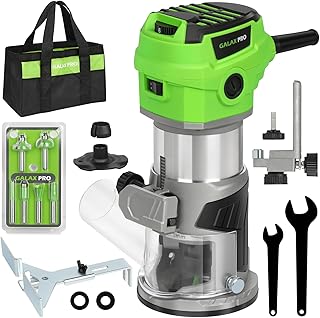
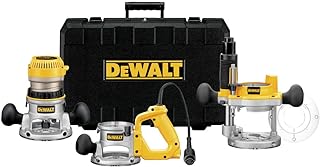


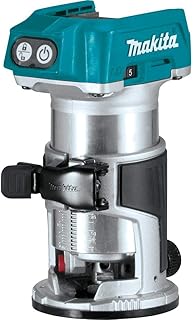


Choosing a precision router is less about finding the most powerful motor and more about matching the router's control, adjustment system, collet capacity, base design and handling characteristics to the work you actually do. A corded Makita router can be an attractive choice for Canadian woodworkers because mains power eliminates battery-runtime limitations, but different router configurations are designed for very different jobs.
For cabinetmaking, furniture work, joinery, trimming, template routing and general woodworking, pay close attention to plunge or fixed-base capability, depth adjustment, speed control, bit compatibility and dust extraction. A router that looks impressive on paper may be less useful if its adjustment mechanism is difficult to fine-tune or its base does not provide the visibility and stability your projects require.
This guide is designed to help Canadian buyers compare specifications and make a better-informed decision. Product specifications, included accessories, retailer policies and current pricing can change, so always verify the latest manufacturer and retailer information before purchasing.
Precision routing requires predictable movement and repeatable adjustments. Motor power matters, but it is only one part of the equation. The best setup for detailed woodworking should allow the operator to control cutting depth, maintain a stable base and select an appropriate router-bit speed for the material and bit diameter.
One of the most important decisions is whether you need a fixed-base router, a plunge router or a configuration that supports both styles. These designs overlap in capability, but they behave differently during common woodworking tasks.
A fixed-base router keeps the cutting depth set relative to the base. This can be advantageous for edge profiling, trimming and repeated cuts where the same depth needs to be maintained. The comparatively straightforward setup can also appeal to users who primarily work along an edge or use a router table.
When evaluating a fixed-base Makita router, look closely at the quality of its depth-adjustment mechanism and the stability of the base. A precise adjustment system is particularly useful when a project requires several shallow passes rather than one aggressive cut.
A plunge router allows the motor and bit to move vertically relative to the base. This makes the design useful for operations where the cut begins inside the workpiece rather than at an existing edge. Mortising, template routing and certain joinery operations are common examples.
For precision plunge routing, examine plunge smoothness, depth stops, turret-stop arrangements, adjustment increments and the ability to lock the mechanism securely. Smooth movement is valuable because hesitation or excessive force can make controlled cuts more difficult.
A combination system can provide greater versatility when both fixed and plunge routing are part of your workflow. However, versatility can come with additional setup requirements. If you rarely need plunge capability, a dedicated fixed-base configuration may be simpler. Conversely, a woodworker who frequently switches between edge work and internal cuts may benefit from a more flexible system.
Motor power is an important specification, but it should not be treated as a direct measure of precision. More power can help a router maintain performance during demanding cuts, yet control and bit selection remain essential.
Consider the type of material and cutter you expect to use. Light edge rounding and trimming do not place the same demands on a router as deep cuts in hardwood or repeated template-routing operations. Making several controlled passes is often preferable to forcing the router through too much material at once.
When comparing models, consider the relationship between motor output, router size, weight and intended application. A very large router may offer substantial cutting capability but can be unnecessarily cumbersome for delicate work. A compact router can be easier to maneuver but may not be the best choice for heavy-duty applications.
Variable speed is particularly useful when a router is expected to handle different bit diameters and materials. Larger-diameter bits generally require more conservative operating speeds than smaller cutters. Following the speed range specified for the router and bit is therefore more important than simply selecting the highest available setting.
Bit geometry, cutter diameter, material hardness and cutting depth all affect the appropriate operating conditions. Always follow the manufacturer's instructions for the specific router bit and router combination.
Collet compatibility is one of the easiest specifications to overlook. Before choosing a router, determine which router-bit shank sizes it accepts and whether the required collet is included or available separately.
Canadian buyers may encounter router bits specified in different measurement systems depending on the manufacturer and retailer. Do not assume that a bit will fit simply because its diameter appears similar. The shank diameter must correspond exactly to the appropriate collet system.
Check the manufacturer's documentation for supported collet sizes, permitted accessories and tightening procedures. The bit should be inserted correctly and securely, with the manufacturer's specified amount of shank engagement.
The base is the interface between the router and the workpiece. Its shape, rigidity, footprint and visibility can substantially affect control. A broad base may provide stability on larger surfaces, while a smaller base can make it easier to maneuver around confined areas.
Clear visibility around the cutter is another important consideration. If the base or dust-collection equipment significantly obstructs the cutting area, positioning the router accurately can become more difficult.
When comparing Makita models, inspect how the base is adjusted, how securely it locks and whether the adjustment method is convenient for the type of work you perform. A base that is quick to adjust is useful for general-purpose work, while highly repeatable adjustment can be especially valuable for cabinet and furniture projects.
Precision routing often involves taking shallow passes until the desired dimension is reached. For that reason, depth adjustment deserves as much attention as motor power.
A useful adjustment system should allow the operator to establish a starting depth, lock it securely and make controlled changes without introducing unnecessary movement. Plunge routers may also include depth-stop arrangements that allow repeated cuts to be made at predetermined depths.
For joinery, compare the adjustment range and locking mechanism rather than relying solely on marketing terminology such as precision adjustment. The practical question is whether the system makes your specific operation easier to repeat accurately.
Some routers incorporate electronic systems intended to help maintain motor performance under changing loads. These features can be useful when cutting conditions vary, but they should be evaluated alongside the fundamentals of good routing technique.
A router can still produce poor results if the bit is dull, the cut is excessively deep, the workpiece is inadequately secured or the feed direction is incorrect. Electronic controls complement good technique rather than replacing it.
Soft-start technology can make a router easier to control as the motor reaches operating speed. A sudden motor start can cause an abrupt movement, particularly with larger machines or when the tool is being positioned close to the workpiece.
Balance is also important. A router that feels comfortable during a short test may become tiring during extended work. Consider the complete weight of the tool, the location of the controls, handle position and how easily the router can be kept square to the work surface.
Routing generates wood dust and chips, making dust management an important part of a workshop setup. A compatible extraction arrangement can improve visibility around the cutting area while helping reduce airborne dust.
When comparing models, check whether a dust-extraction port is included, what accessories are supplied and how the extraction connection is configured. Compatibility with your existing shop vacuum or dust extractor can prevent the need for additional adapters.
Dust extraction does not eliminate the need for appropriate personal protective equipment and workshop ventilation. Follow the router, vacuum and accessory manufacturers' safety instructions.
Makita offers routers and woodworking tools in different configurations, so buyers should compare individual model specifications rather than assuming that every Makita router provides the same features.
Cabinetmaking frequently requires repeatable dimensions, clean edges and controlled joinery. A router used for this work should therefore be evaluated for adjustment accuracy, stability and compatibility with guides or templates.
For edge profiling, a stable fixed-base setup can be convenient. For internal cuts, mortises or template operations, plunge capability may be more useful. If the router will be used extensively, ergonomics and dust extraction can become increasingly important.
Cabinetmakers should also consider whether the router integrates effectively into the broader workflow. A router that works well with existing templates, guides, bits and extraction equipment may be more useful than a theoretically more powerful machine that requires substantial changes to the workshop setup.
Furniture projects often involve hardwoods, edge profiles, stopped cuts, templates and repeated operations. A versatile corded router can be useful because it can operate continuously without the runtime considerations associated with battery-powered equipment.
Look for a combination of adequate power, controllable speed, precise depth adjustment and comfortable handling. For delicate furniture components, excessive weight can make detailed work harder, while insufficient capacity can become a limitation during demanding operations.
DIY users may not need the largest router available. If your projects consist primarily of shelf edges, decorative profiles, trimming and occasional joinery, a manageable router with straightforward adjustments may provide a better balance than a heavy professional-oriented machine.
Before buying, list the jobs you realistically expect to perform. This simple exercise can prevent paying for capabilities you will rarely use while helping identify specifications that matter more to your projects.
A router can be used handheld or, where the specific model and accessories support it, in a router-table setup. These approaches serve different purposes.
Handheld routing provides mobility and is particularly useful when the workpiece is too large or awkward to bring to a stationary setup. A router table can provide a more controlled arrangement for certain edge-profile and repeat-production tasks.
Do not assume that every corded Makita router is suitable for every router table. Check the specific model's documentation and the table manufacturer's compatibility requirements before attempting a table installation.
Different materials place different demands on a router and cutter. Solid wood, plywood, MDF and other engineered boards can behave differently during routing, particularly at edges and around veneers or laminated surfaces.
Hardwood routing generally benefits from sharp, appropriate-quality bits and controlled feed rates. Deep cuts can increase the load on the router and may reduce control, so multiple passes are often preferable for substantial material removal.
Plywood can produce good results with appropriate cutters and technique, but edge tear-out and veneer chipping should be considered. Test cuts on scrap material can help establish a suitable setup before working on a finished component.
MDF can be easy to shape but produces considerable fine dust. Effective extraction and appropriate respiratory protection are particularly important when routing MDF. Keep the cutter sharp and avoid unnecessarily aggressive passes.
Softwood can be easier to cut but may be more susceptible to crushing, fuzzing or tear-out depending on grain direction and cutter condition. A controlled feed rate and sharp bit can make a substantial difference.
Router-bit diameter influences both cutting behavior and the appropriate operating speed. Larger cutters remove more material and generally require greater attention to speed, feed rate and cutting depth.
Do not select a large bit simply because the router has sufficient motor power. The router-bit manufacturer's operating instructions should always take priority, particularly for large-profile cutters.
Feed direction is a fundamental routing consideration. Conventional routing generally provides the predictable resistance expected when the cutter rotates against the direction of travel. Climb cutting reverses that relationship and can cause the router to pull itself along the workpiece.
Climb cuts can be useful in specialized situations when performed with suitable equipment, technique and experience, but they can be significantly less forgiving. For routine work, follow established routing procedures and the safety guidance supplied with the router and bit.
Even an accurately engineered router cannot compensate for a moving workpiece. Before routing, make sure the material is properly supported and securely clamped.
Rather than ranking routers solely by power or price, compare them against the requirements of your intended applications. A useful evaluation should consider the complete ownership proposition.
Several specifications are useful only when considered alongside one another. For example, motor power tells you little about how comfortable a router will be during detailed work. Likewise, a broad speed range is less valuable if the machine is difficult to adjust or handle.
Think of the router as a system consisting of the motor, base, collet, controls, adjustment mechanism and accessories. The strongest buying decision is usually the model whose complete configuration fits the user's work rather than the one with the most impressive single specification.
High motor output does not automatically mean greater precision. For many woodworking applications, control and adjustment quality are more important than maximum power.
Buying a router without checking the required bit-shank compatibility can create an avoidable accessory problem. Verify this before ordering the machine or a collection of router bits.
A fixed-base router is not a direct replacement for a plunge router in every application. Decide whether your work requires edge-based cuts, internal starts or both.
A heavy router may provide excellent capacity but can be tiring during prolonged handheld work. Consider how frequently the router will be lifted, repositioned and controlled with both hands.
Dust collection is easy to overlook during a purchase but becomes important once routing begins. Check the extraction arrangement before selecting a model.
A large router-bit collection is not necessarily useful. Start with cutters suited to your actual projects and expand the selection as your woodworking needs develop.
Customer reviews can provide useful information, but they should be interpreted carefully. Look for reviews that describe a specific application, setup and result rather than comments that simply state whether someone likes the product.
Repeated comments about adjustment difficulty, base stability, accessory quality, switch placement or dust extraction may deserve closer attention. At the same time, an isolated complaint does not necessarily establish a product-wide problem.
Pay attention to whether the reviewer used the router for the same type of work you intend to perform. A router that receives praise from a DIY user for occasional edge work may not be the ideal choice for someone performing continuous cabinetmaking operations.
Makita is one of several established power-tool brands worth considering when shopping for a corded router. Depending on the Canadian market and your application, buyers may also encounter Bosch, DeWalt, Milwaukee and Porter-Cable products.
The right comparison is not necessarily brand against brand. Compare the specific router configurations, compatible accessories, adjustment mechanisms, base systems, service arrangements and current specifications. Brand reputation can help establish a shortlist, but the individual model should determine the final decision.
When comparing Makita and Bosch, examine the exact base configuration, motor characteristics, adjustment system and accessory ecosystem. Both brands offer woodworking equipment in different formats, so a direct model-to-model specification comparison is more meaningful than a general brand preference.
For precision work, focus particularly on depth adjustment, handling, visibility, collet compatibility and the availability of accessories relevant to your projects.
DeWalt is another major brand commonly considered by Canadian power-tool buyers. Compare individual models for power, speed control, base design, ergonomics, adjustment range and included accessories.
If your workshop already uses a particular accessory ecosystem, consider whether the router integrates conveniently with the equipment you already own. However, do not sacrifice the specifications you actually need merely to maintain brand consistency.
Milwaukee is particularly prominent across professional power-tool categories, although corded and cordless product availability can vary by category and market. If comparing Milwaukee with Makita for routing, evaluate the specific tools available to you rather than assuming that a cordless platform automatically provides an equivalent corded-router configuration.
Porter-Cable has a long association with woodworking routers and accessories. When comparing a Porter-Cable option with a Makita model, focus on current model specifications, base configuration, compatibility, ergonomics and accessory availability rather than relying solely on historical brand reputation.
Good results depend on both the tool and the operator. Even a well-designed router can produce tear-out or inconsistent cuts when the technique is unsuitable for the material.
Removing too much material in one pass can increase motor load, make the router harder to control and increase the likelihood of tear-out. Multiple passes allow the cutter to remove material progressively.
The ideal depth per pass depends on the router, cutter, material and operation. Follow the instructions provided by the router and bit manufacturers rather than applying a universal depth rule to every job.
Regular maintenance helps keep a corded router operating consistently. Before maintenance, disconnect the tool from its power source and follow the manufacturer's instructions.
A precision router is only as effective as the cutter installed in it. Dull or damaged bits can increase cutting resistance, produce poor surface quality and place unnecessary load on the router.
Inspect bits before use and replace or professionally service them when required. Store cutters so their cutting edges cannot contact one another or other hard objects.
Routers are high-speed cutting tools and require appropriate precautions. Read the manufacturer's instructions before use and follow the safety requirements for the specific model and accessory.
Canadian shoppers should verify the current configuration and local purchasing terms rather than assuming that a model listed in another market has identical specifications or accessories in Canada. Product bundles can differ by region, and retailers may use similar product names for different configurations.
Before purchasing, compare the exact model number, included accessories, electrical specifications, retailer terms and current total cost. If an accessory is essential to your intended application, confirm that it is actually included in the package you are considering.
A router purchase is only the beginning of a useful routing system. Depending on your projects, you may also need suitable router bits, guides, templates, clamps, dust extraction and workholding equipment.
Prioritize manageable size, straightforward controls, stable base support and a clear adjustment system. A simpler router that you can control confidently is often more useful than an oversized machine with capabilities you will rarely use.
Experienced users may place greater emphasis on adjustment repeatability, speed control, accessory compatibility, dust extraction and the ability to integrate the router into established workflows.
Look closely at repeatability, template compatibility, plunge capability where required, base stability and the ability to make consistent shallow cuts.
Balance power with handling. A versatile router should provide sufficient capacity for the materials and cutter sizes you use without becoming unnecessarily cumbersome during detailed work.
Focus on the jobs you actually expect to perform. Straightforward operation, useful accessories and reasonable handling can be more valuable than professional-level capacity that remains unused.
The lowest purchase price is not necessarily the lowest overall cost. A router may require additional collets, guides, bases or extraction adapters depending on the intended application. Conversely, paying more for features you will never use does not necessarily represent better value.
A practical value comparison should include the tool itself, required accessories, router bits, extraction requirements and the expected frequency of use. For an occasional DIY project, simplicity may provide better value. For frequent professional woodworking, adjustment quality, durability-related design features and accessory compatibility may justify prioritizing a more capable configuration.
Use the comparison information on this page as a framework for evaluating individual listings. When viewing a product, confirm the exact model number and compare its current specifications with your requirements.
Pay particular attention to package contents. Two listings can use similar descriptions while including different bases, collets or accessories. Always read the current listing carefully and verify important specifications with the manufacturer when necessary.
There is no single best configuration for every woodworker. The right choice depends on whether you need fixed-base routing, plunge capability, variable speed, particular collet sizes, fine depth adjustment or compatibility with existing guides and accessories. Compare the exact models against your intended applications rather than selecting solely by power or price.
Yes. A corded router can be particularly useful for workshop users who value continuous mains-powered operation and do not want to manage battery runtime or charging. The choice between corded and cordless should be based on the working environment and the type of routing you perform.
Neither is universally better. A plunge router is useful for cuts that begin within the workpiece and for operations requiring controlled vertical movement. A fixed-base router can be convenient for edge work and applications where a consistent fixed cutting depth is desirable.
The required power depends on material, cutter size, cutting depth and workload. Light trimming and edge profiling generally require less capacity than repeated deep cuts in hardwood. Instead of choosing based only on the highest power rating, consider the complete specification and intended application.
No. Router-bit compatibility depends on the collet and specific model. Check the manufacturer's specifications for the exact router before purchasing bits or assuming an existing cutter will fit.
Variable speed can be useful when working with different bit diameters and materials because the appropriate operating speed can vary. It is especially worth considering if your projects involve a broad range of cutters.
Some router configurations may be compatible with router-table applications, but compatibility depends on the exact model, base and table. Always confirm the manufacturer's instructions and the table's requirements before installation.
Look for stability, secure locking, useful visibility around the cutter and an adjustment system that allows the required cutting depth to be established consistently. The best base depends on whether you are performing edge work, template routing, joinery or other operations.
Bit quality matters because cutter condition and geometry directly influence cutting performance. Rather than purchasing a large collection, choose appropriate bits from reputable manufacturers that match your applications and keep them clean, sharp and properly stored.
There is no universal replacement interval. Service life depends on the bit material, construction, frequency of use, workpiece material and cutting conditions. Inspect cutters regularly and replace or appropriately service them when they become damaged or no longer produce acceptable results.
Accuracy comes from the complete setup rather than one feature. Stable workholding, a suitable sharp bit, controlled feed rate, proper cutting depth and a router with predictable adjustment and handling all contribute to accurate results.
Yes. Makita is a strong brand to consider, but buyers can also compare suitable models from Bosch, DeWalt, Milwaukee and Porter-Cable. The most useful comparison is model-to-model, focusing on the specifications, accessories and workflow that matter to you.
The best precision Makita corded router is the one that matches your actual woodworking requirements rather than simply offering the largest motor or longest feature list. Start by identifying the cuts you make most often, then compare base configuration, depth adjustment, speed control, collet compatibility, ergonomics, dust extraction and accessories.
For Canadian buyers, also verify the exact model, current package contents, electrical specifications and retailer information before ordering. Taking a few minutes to compare these details can help avoid buying a router that is powerful but poorly matched to your workflow.
Whether you are building cabinets, making furniture, completing DIY projects or developing a more capable workshop, a thoughtful comparison of the router, bits and supporting accessories will usually produce a better result than choosing based on headline specifications alone.