

♥ Wishlist
Compare 43 Milwaukee Routers products in Canada. Reviews, ratings, pros, cons and buying advice updated for October 2026.

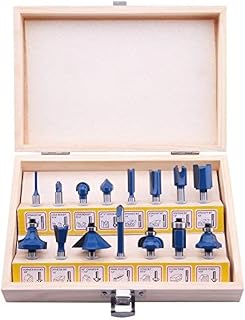
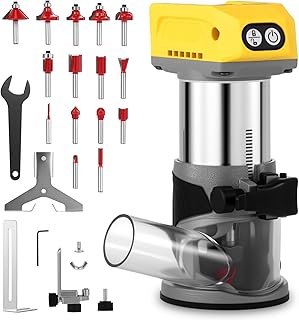


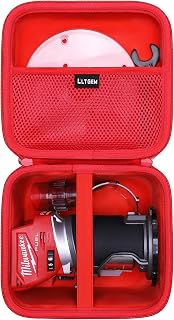


Choosing a precision Milwaukee router is less about selecting the most powerful tool and more about matching the router's design, control system, adjustment method, compatibility and intended workload to the work you actually perform. A compact cordless router can be an excellent choice for edge profiling and trim work, while a router with a plunge-style base is better suited to controlled mortising, template routing and operations that begin inside a workpiece.
For Canadian buyers, the decision also involves battery-platform compatibility, charger availability, replacement accessories, voltage considerations, warranty terms, shipping availability and the type of wood or sheet material being machined. Before comparing individual models, establish the jobs you expect to perform most often. This prevents paying for features that add weight or cost without improving the work you need to accomplish.
Router requirements change considerably depending on the application. Edge work, joinery, decorative profiling, cabinetmaking and template routing each place different demands on the tool.
The word “precision” should not be interpreted simply as high motor output. Accurate routing depends on the complete system: motor behaviour, base rigidity, depth adjustment, bit quality, workpiece stability and operator control all contribute to the final result.
Fine depth adjustment is one of the most important features for detailed woodworking. A good adjustment mechanism should allow the user to establish a repeatable cutting depth without excessive movement or complicated setup.
When comparing Milwaukee router configurations, examine how the depth is adjusted, how securely the setting locks and whether the mechanism allows small incremental changes. This becomes particularly important when fitting joinery, producing shallow decorative profiles or making several identical components.
A router can have an excellent motor and still produce inconsistent results if its base does not remain stable against the workpiece. A broad, rigid base can make controlled movement easier, while a smaller base may offer better access in confined areas.
For precision work, check whether the base provides a clear view of the cutting area and whether the adjustment mechanism allows you to maintain the intended depth throughout the operation.
Speed control can be useful when working with different router-bit diameters and materials. Larger bits generally require more careful speed selection than smaller bits, and material characteristics can also influence the appropriate operating speed.
Do not assume that the highest available speed is automatically the best setting. Follow the router-bit manufacturer's operating recommendations and adjust the process according to the material, bit diameter and cutting operation.
A controlled start can make a router easier to handle because the tool does not immediately reach operating speed with the same abruptness as a basic motor design. Smooth acceleration can be particularly helpful when precise positioning matters.
Consistent motor behaviour under load is also important. When routing dense hardwood or taking repeated passes, avoid forcing the tool. A router should remove material progressively rather than being pushed aggressively through a cut.
Milwaukee's cordless power-tool ecosystem is an important consideration for buyers who already own compatible batteries. A cordless router can eliminate the power cord from the immediate work area and can be convenient for installation work, jobsite applications and locations where mains power is inconvenient.
A corded router can still make sense for users who spend most of their time in a workshop and prefer continuous operation without managing battery charge. Neither approach is universally superior. The right choice depends on workload, portability and the rest of the tools in your workshop.
If your router remains at a dedicated bench and is used for long sessions, a corded machine can be a practical alternative. Continuous access to electrical power removes battery-runtime considerations and can make sense for users who do not otherwise use cordless tools from the same ecosystem.
Before purchasing a cordless Milwaukee router in Canada, determine whether the tool is sold as a bare tool or as a complete kit. A bare tool can be economical for an existing Milwaukee battery user, but the apparent purchase price can be misleading if you also need a battery and charger.
Check the exact battery-platform requirement rather than assuming that every Milwaukee cordless battery is interchangeable. Platform compatibility should be confirmed against the specific router model, especially when comparing older and newer tool generations.
Collet compatibility is one of the easiest specifications to overlook when shopping for a precision router. The router must accept the shank size of the bits you intend to use, and the bit must be appropriate for the router's operating requirements.
Common router-bit shank formats include 1/4-inch and 1/2-inch designs. Compact routers frequently focus on smaller shank sizes, while larger woodworking routers may accommodate additional options. Never assume a bit will fit simply because it is described as a router bit.
Always verify the exact collet specification for the individual Milwaukee router and confirm the bit manufacturer's requirements before purchase.
A precision router cannot compensate for a poor-quality, damaged or incorrectly installed bit. Sharp carbide cutters can produce cleaner results and reduce the amount of force required to move the router through the material.
Well-known accessory manufacturers such as Bosch, Freud and Diablo offer router-bit options, but the important consideration is whether the specific bit is appropriate for your material, router, cutting depth and operating speed.
Base configuration can fundamentally change what a router is convenient to use for. Fixed-base designs are often straightforward for edge work and repeatable routing where the cutting depth is established before the operation. Plunge configurations allow the cutter to move vertically into the material, which is useful for applications where the cut needs to begin away from an existing edge.
Good visibility is essential for precision work. The operator needs to see the bit, the intended cutting path and the surrounding workpiece without constantly changing position.
When comparing routers, examine the shape of the base, the amount of open viewing area around the cutter and the position of adjustment controls. A design that looks impressive on a specification sheet may not be the easiest to control during detailed work.
Routing creates substantial chips and fine dust, particularly when working with MDF, plywood and other manufactured wood products. Effective dust collection can improve visibility around the cutting area and reduce the amount of airborne debris in the workspace.
When comparing a Milwaukee router, inspect the dust-extraction provisions of the exact base and accessory configuration rather than assuming every version provides identical collection options.
For workshop use, consider how the router will connect to your existing dust extractor or shop vacuum. The adapter, hose diameter and accessory compatibility can matter just as much as the router itself.
Hardwoods can demand careful feed control and sharp bits. Multiple shallow passes are often preferable to trying to remove a large amount of material in one operation. Router speed should be selected according to the bit manufacturer's guidance and the specific material.
Softwoods can be easier to cut but may be more susceptible to tear-out, especially around knots or changing grain direction. A sharp bit and controlled feed rate are important for clean edges.
Plywood construction varies considerably between products. Veneer faces can chip or splinter if the cutting direction, bit condition and feed rate are not appropriate. Test cuts on scrap material can help establish a reliable setup before working on the final component.
MDF can generate significant fine dust during routing. Dust extraction, respiratory protection appropriate to the work environment and good workshop ventilation should be treated as important considerations. Keep the cutting tool and work area clean because accumulated dust can interfere with visibility and equipment operation.
The router itself is only one part of the cutting system. A buyer who chooses an expensive router but uses an unsuitable bit may obtain worse results than someone using a more modest router with an appropriate, sharp and correctly installed bit.
Many router purchases go wrong because the buyer concentrates on headline specifications instead of the complete workflow. A careful comparison should include the tool, base, battery requirements, bits, accessories and intended applications.
More power does not automatically mean better precision. If your primary work involves small edge profiles or delicate trimming, control and ergonomics may be more important than maximum output.
A router's usefulness depends heavily on the base you use. Confirm whether the included configuration matches your work and whether additional bases or accessories are required for the operations you intend to perform.
A bare cordless router may appear inexpensive compared with a complete kit, but the total investment changes if you need batteries and charging equipment. Compare the complete setup rather than the tool-only price.
Do not build your accessory collection around assumptions. Verify the exact collet and shank compatibility before buying router bits.
A larger machine may provide advantages for demanding cuts, but excessive size can reduce convenience for fine edge work. Match the physical size of the router to the workpiece and application.
A large router-bit set is not necessarily a better purchase. Start with the profiles you genuinely use, then expand the collection as your projects require additional cutting patterns.
When a buying guide presents multiple Milwaukee router options, compare them using the same criteria instead of relying solely on ranking position. A router listed first is not automatically the best choice for every Canadian buyer.
Cabinetmaking places particular emphasis on repeatability. When routing several doors, shelves, panels or joinery components, small differences in depth or positioning can become obvious across the finished project.
Look for a router that allows you to establish a reliable setup and reproduce it consistently. A stable base, accurate depth control and suitable guides can be more valuable than additional features that you will rarely use.
If the router will be used primarily for edge profiles, a compact configuration can be convenient. If the work includes recessed areas or internal cuts, investigate whether a plunge arrangement would provide a more suitable workflow.
Edge routing often benefits from a compact and well-balanced tool. The closer the router is to the edge of the workpiece, the more important handling and base stability become.
For trim work, pay close attention to the router's centre of gravity and your ability to maintain consistent pressure against the reference surface. A comfortable tool is easier to control during repeated passes, but comfort should never replace proper workpiece support and safe routing technique.
DIY users generally benefit from versatility rather than specialised features. If you perform a mixture of shelf work, furniture repairs, edge profiling, decorative routing and small joinery projects, a versatile configuration may provide better value than a highly specialised machine.
Consider the accessories you are realistically likely to use. Buying a router that supports your existing Milwaukee battery system and a practical selection of bits may be more useful than purchasing the most feature-rich configuration available.
Router accuracy is strongly affected by the setup surrounding the tool. A stable workbench, secure clamps and a properly supported workpiece can make a larger difference than small differences between comparable routers.
Clean routing is usually the result of several small factors working together. A sharp bit, stable workpiece, suitable speed, controlled feed and appropriate cutting depth all contribute to the finish.
If a cut looks rough, do not immediately assume the router lacks power. Check the bit condition, bit type, cutting depth, feed direction, material and setup. Tear-out can also occur because of grain direction rather than because of an inadequate router.
When a substantial amount of material needs to be removed, dividing the operation into several controlled passes can reduce the load on the cutter and make the router easier to manage. The exact depth of each pass should be appropriate for the bit, material and router configuration.
A scrap piece of the same or similar material is one of the simplest ways to verify depth, profile, speed and feed technique. This is especially useful when the finished workpiece is expensive or difficult to replace.
Routers are high-speed cutting tools and should be treated accordingly. Read the manufacturer's instructions for the specific Milwaukee model before operation and follow the safety requirements supplied with the tool and accessories.
Routine maintenance helps preserve consistent operation. After use, remove accumulated dust and chips from the base, vents and accessible areas. Keep the router and accessories stored in a dry, protected location and follow the manufacturer's maintenance instructions.
Inspect the collet, base, adjustment mechanisms and power components periodically. Router bits should also be inspected separately because a damaged accessory can compromise both cutting quality and safe operation.
Customer reviews can provide useful information, but they should be interpreted carefully. A review describing excellent performance for small trim projects does not necessarily prove that the same router is ideal for demanding production routing.
Look for reviews that explain the application, material, bit type, workload and setup. Detailed feedback is generally more useful than a short statement about whether someone liked the tool.
Product pages and retailer listings can change over time, so verify the exact model number before purchasing. This is particularly important when several configurations look similar but contain different bases, batteries, accessories or packaging.
Milwaukee is not the only brand worth considering. The best router depends on the complete combination of performance, ergonomics, accessory ecosystem and your existing tool collection.
Bosch, Makita, DeWalt and Festool are among the established names buyers may encounter when comparing routers and woodworking systems. Different manufacturers emphasise different combinations of portability, precision, power, accessories and workshop integration.
Compare the two based on the specific router configuration rather than brand reputation alone. Battery-platform compatibility, base options, depth adjustment and accessory availability should be examined for the exact models under consideration.
For cordless users, battery-platform considerations can become a major deciding factor. If you already own tools from one ecosystem, staying within that platform may simplify battery management. For new buyers, compare the complete tool-and-accessory cost before choosing.
Both brands have extensive cordless ecosystems, so platform compatibility can be particularly relevant. Compare the individual router's handling, base design, collet specification, adjustment system and included accessories instead of assuming that one brand is universally better.
Festool is another name that may appear in precision woodworking comparisons. Buyers should consider the intended level of workshop integration, dust management, accessories, precision requirements and total system cost before deciding whether a premium-oriented woodworking system is appropriate.
A Milwaukee router can be a logical choice for buyers who value the brand's cordless ecosystem, want a portable routing solution or need a versatile tool for woodworking and installation tasks. The strongest fit depends on the specific model and base configuration rather than the Milwaukee name alone.
If you already own compatible Milwaukee batteries and chargers, a bare router may integrate conveniently into your existing workshop or jobsite setup. Always confirm the exact battery compatibility before purchase.
Users who frequently move between work areas may appreciate a cordless setup because it reduces dependence on nearby electrical outlets and eliminates the need to route a power cord around the immediate cutting area.
If your primary requirement is prolonged, demanding routing in a dedicated workshop, compare cordless and corded alternatives carefully. Runtime, heat management, tool weight and continuous-power requirements can influence the better choice.
The true cost of a routing setup can include much more than the main tool. A realistic comparison should account for the accessories needed to perform your intended work.
This approach makes comparisons more meaningful because two products with similar advertised prices can have very different costs once the necessary accessories are included.
The best choice depends on the type of precision work involved. Edge profiling may favour a compact and highly controllable configuration, while template routing, mortising and internal cuts may benefit from plunge capability. Compare the exact model, base configuration, depth-adjustment system, collet specification and accessory compatibility before choosing.
Yes, cordless routers can be suitable for many woodworking applications when the tool, battery, bit and material are appropriately matched. For longer or heavier operations, compare battery requirements and expected workload against corded alternatives.
It depends on the specific product configuration. Some listings are sold as bare tools while others may be packaged as kits. Always check the contents of the exact Canadian listing before purchasing.
No assumption should be made based only on the Milwaukee brand. Verify the battery-platform requirement for the exact router model and generation before purchase.
A beginner should select bits according to the projects they actually intend to build. A small selection of commonly useful profiles can be more practical than purchasing a large set containing profiles that may rarely be used.
Neither is universally better. A plunge base provides advantages when entering a cut within the workpiece, while fixed-base arrangements can be convenient for many edge-routing and repeatable-depth applications.
Not necessarily. Clean results depend on the bit, material, cutting depth, feed rate, speed, workpiece stability and operator technique. Excessive power without appropriate control does not guarantee a better finish.
Variable speed can provide additional flexibility when working with different bit sizes and materials. Use the operating recommendations supplied by the router-bit manufacturer and avoid selecting a speed simply because it is the maximum available setting.
An existing compatible battery collection can make a cordless Milwaukee router particularly convenient, but the decision should still be based on the router's specifications and your applications. Confirm battery compatibility and compare the complete cost of the setup.
There is no universal replacement interval because bit life depends on the cutter material, workload, cutting depth, material and usage conditions. Replace or service bits when they become damaged, excessively worn or unable to produce acceptable results, following the accessory manufacturer's guidance.
Compact routers can be useful for many cabinetmaking operations, particularly edge profiling, trimming and smaller routing tasks. For larger cuts or operations requiring deeper internal entry, evaluate whether a larger or plunge configuration is more appropriate.
Before committing to any router in this 2026 buying guide, use the following checklist to compare the exact configuration rather than relying on the product name alone.
The best precision Milwaukee router is the one that matches your actual routing workload, accessories, battery ecosystem and preferred working environment. A compact router can be an excellent choice for controlled edge work, while a plunge-capable setup may be more appropriate for internal cuts and template-based applications. The most important decision is therefore not simply which router has the highest specification, but which configuration provides the control, compatibility and versatility your projects require.
For Canadian shoppers, compare the exact model number, current specifications, package contents, battery requirements and total cost before purchasing. Check today's retailer pricing and availability separately, because these details can change throughout 2026. Most importantly, compare the router with the bits, base, battery and accessories you will actually use. That complete-system approach provides a much more reliable basis for choosing among the best Milwaukee router options.