

♥ Wishlist
Compare 12 Best Cordless Routers for Woodworking in Canada products in Canada. Reviews, ratings, pros, cons and buying advice updated for October 2026.
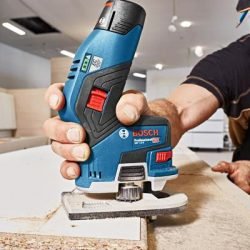
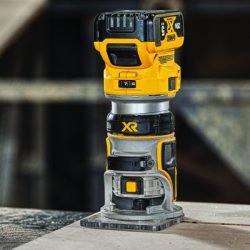
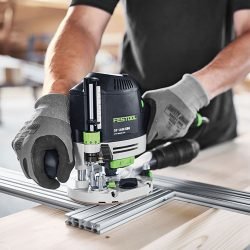

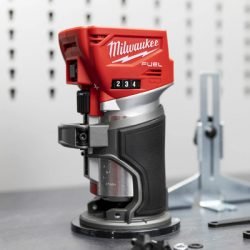
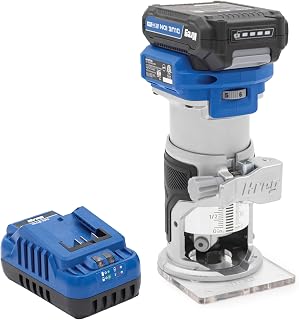


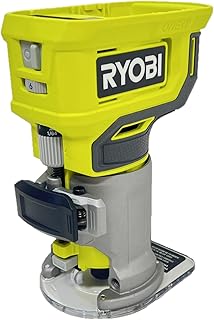


A precision cordless router can be a practical choice for Canadian woodworkers who want the flexibility of a compact trim router without managing a power cord around a workpiece. The best model depends on more than maximum speed or battery voltage. Collet compatibility, depth adjustment, base stability, bit visibility, ergonomics, battery platform, dust collection, and the type of wood being routed all affect how accurately and comfortably a router performs.
For buyers comparing cordless routers in 2026, it is useful to separate genuine precision features from specifications that look impressive on a product page but have limited importance for a particular project. A compact router used for edge profiling has different requirements from one used for template work, hinge recesses, sign making, cabinetry, or repeated trimming of laminate.
This guide focuses on the factors that matter when comparing precision cordless routers available to Canadian consumers. Product specifications, included accessories, battery configurations, retailer stock, and pricing can change, so check the current specification sheet and retailer listing before purchasing.
Precision in routing comes from the complete system rather than one specification. A useful cordless router should allow the user to make small, controlled changes to cutting depth while keeping the motor and base stable against the material.
Cordless routing is primarily about convenience and freedom of movement. A battery-powered compact router eliminates the power cord from the immediate work area, which can be helpful when trimming cabinet components, working on a job site, or routing smaller pieces away from a permanent workshop bench.
A corded router can still be the more appropriate choice for prolonged heavy routing. Continuous mains power removes the need to monitor battery charge and can make sense when the router is used for extended sessions or demanding cuts.
It is also important not to compare battery voltage directly with the power rating of a corded router as though the figures were equivalent. Manufacturers use different ways of describing cordless and corded power, so the practical design, intended application, cutting capacity, and user requirements deserve more attention than a simple voltage comparison.
For many Canadian buyers, the battery ecosystem is one of the most important purchasing decisions. A bare-tool cordless router may be attractive when the buyer already owns compatible batteries and a charger. Someone starting from scratch should consider the cost and usefulness of the entire platform rather than judging the router alone.
Popular professional and consumer tool ecosystems include DeWalt, Makita, Milwaukee, Bosch, Ryobi, and RIDGID. Compatibility is normally specific to the manufacturer's battery family, so a battery that looks physically similar should never be assumed to work with another brand.
Battery capacity is usually expressed in ampere-hours (Ah). A higher Ah rating generally means greater stored energy, but it can also add weight and bulk. The ideal battery for precision routing is therefore not necessarily the largest battery available.
Runtime varies considerably with cutting depth, bit diameter, material, feed rate, motor load, battery condition, and operating technique. Routing dense hardwood at an aggressive feed rate places a very different demand on a battery than making occasional shallow passes in softwood.
For detailed work, a smaller battery can sometimes provide a more compact and maneuverable setup. For repeated routing, having a second compatible battery can be more useful than choosing the heaviest battery available.
Brushless motors are common in modern cordless power tools and can offer advantages in efficiency, heat management, and electronic control. A brushed motor can still be entirely suitable for appropriate routing applications, so motor type should not be treated as the only measure of quality.
When comparing brushless models, look at the entire tool design. Motor technology does not compensate for poor depth adjustment, an unstable base, awkward controls, or an unsuitable collet.
Collet compatibility is one of the easiest specifications to overlook. Compact cordless routers commonly use smaller router-bit shanks, with 1/4-inch bits being particularly common in North American woodworking.
A buyer should verify the supplied collet size and determine whether the desired router bits are available in that configuration. Do not assume that a router can safely accept every bit that physically appears to fit.
Variable-speed control can be useful when working with different bit diameters and materials. Larger cutters generally require lower rotational speeds than smaller cutters, and the appropriate speed should always follow the bit manufacturer's recommendations.
Electronic speed management can also help a cordless router maintain more consistent operation as cutting load changes. However, the presence of electronic controls does not eliminate the need for an appropriate feed rate.
For precision work, controllability is usually more valuable than simply selecting the highest available speed. A router should allow the operator to maintain a smooth, deliberate feed without forcing the cutter through the material.
Depth adjustment is central to precision routing. A good adjustment mechanism allows the user to establish the cutting depth accurately and lock the base securely before beginning the cut.
Look for a design that makes it easy to see and repeat settings. Micro-adjustment is particularly helpful when the final depth needs to be changed by a small amount rather than making a large adjustment and hoping it lands correctly.
Many compact routers are primarily designed for fixed-base applications such as edge profiling, trimming, rounding over, and shallow decorative cuts. Some systems offer additional bases or plunge functionality.
A plunge base can expand the range of applications by allowing the cutter to enter the workpiece after the router has been positioned. This can be useful for mortises, grooves, template routing, and certain joinery operations.
If you are primarily trimming laminate or profiling exposed edges, a compact fixed-base configuration may be sufficient. If you expect to perform a broader range of joinery work, investigate whether the specific model supports a compatible plunge base rather than assuming every cordless router does.
The base is the physical connection between the router and the workpiece. Its shape, rigidity, material, and visibility all affect control.
A transparent or open design can make it easier to see the cutter and reference edge. A broad stable base can provide confidence on larger surfaces, while a smaller footprint may make it easier to work around tight profiles. Neither design is universally superior; the right choice depends on the job.
Routing produces chips and fine dust, and dust management becomes particularly important when working with engineered wood products or in enclosed workshop spaces. A router with provisions for dust extraction can make cleanup easier and may improve visibility around the cut.
Check exactly what dust-collection accessories are included. Some products may provide an extraction port or adapter while requiring the buyer to supply a compatible vacuum hose.
Dust extraction should complement, not replace, appropriate personal protective equipment and safe workshop practices. Use suitable respiratory protection when required for the material and work environment, and follow the material manufacturer's safety recommendations.
A precision router cannot compensate for a poor-quality, damaged, incorrectly installed, or inappropriate router bit. The cutter determines the profile and has a major influence on surface finish, cutting load, and the quality of the finished edge.
Common bit categories include straight bits, flush-trim bits, round-over bits, chamfer bits, rabbeting bits, pattern bits, and specialized joinery cutters. Choose the cutter based on the operation rather than purchasing a large assortment simply because it contains many profiles.
Canadian woodworking projects may involve maple, birch, oak, ash, walnut, softwood, plywood, MDF, particleboard, and laminated materials. These materials do not place identical demands on a compact router.
Hardwoods generally reward a conservative cutting approach. Rather than attempting to remove a large amount of material in one pass, use multiple controlled passes where appropriate. This can reduce the load placed on the cutter and router while improving control.
For dense hardwood projects, buyers should pay particular attention to motor performance under load, battery capacity, thermal management, bit quality, and the router's ability to maintain a controlled feed rate.
Cabinetmaking often involves repeated, controlled operations rather than extremely deep cuts. A compact cordless router can be useful for edge profiling, trimming, small grooves, template work, and other detail operations.
For cabinetry, repeatability can be more important than headline motor specifications. A router that is easy to adjust and return to the same depth can save time when several components require identical treatment.
Compact cordless routers are particularly suited to many trimming applications because they can be maneuvered around edges without a power cord crossing the workpiece.
Flush-trim and laminate-trimming operations require careful control. The cutter should be selected for the material and application, and the router should be supported consistently against the reference surface. Avoid forcing the router into the material simply to finish the cut faster.
Template routing places additional emphasis on guide compatibility, base visibility, and smooth depth adjustment. If your projects involve repeated lettering, shapes, or decorative patterns, investigate whether the router supports the guide accessories required by your template system.
A compact router can be convenient for these applications, but the overall setup includes the router, base, guide system, template, cutter, workholding arrangement, and dust management. Evaluating the entire system produces a more useful buying decision than comparing motor specifications alone.
Canadian workshops frequently use a mixture of metric and imperial measurements. Router-bit sizes, fasteners, templates, guides, and woodworking plans may use either system.
Before purchasing accessories, check their actual dimensions rather than relying on general descriptions such as "standard size." A router may use an imperial collet while a particular accessory system uses metric dimensions, or vice versa.
A compact router should feel controllable rather than simply small. Grip shape, switch placement, center of gravity, base size, and battery position can all influence handling.
Do not assume that a lighter bare tool will always be easier to use. A very small battery-powered router can become awkward if the battery, motor, and base create an unbalanced setup. Conversely, a slightly heavier configuration may feel more stable during an edge pass.
If possible, assess the complete configuration you intend to use, including the battery. The weight and balance of the bare tool shown in product specifications may not represent the final working setup.
Higher nominal voltage does not automatically mean greater precision or a better tool for every project. Compare the complete specification and intended application.
A low-priced bare tool can look attractive until the cost of a compatible battery and charger is added. Buyers should compare complete ownership requirements.
Always confirm the router's supported shank size before buying a collection of bits.
Base compatibility is model-specific. Check manufacturer documentation before purchasing additional bases or accessories.
Maximum rotational speed is only one part of router performance. Cutter diameter, material, feed rate, depth of cut, and manufacturer's recommendations all matter.
A smaller selection of quality cutters matched to your actual projects is often more useful than a large inexpensive assortment containing profiles you rarely use.
A larger battery can increase runtime while changing the balance and handling of a compact router. Consider ergonomics as part of the complete configuration.
A router becomes more versatile when compatible guides, bases, fences, dust adapters, and templates are readily available. Confirm accessory compatibility before committing to a platform.
When comparing models from brands such as DeWalt, Makita, Milwaukee, Bosch, Ryobi, and RIDGID, avoid creating a ranking based on one specification. Instead, evaluate each router against the type of work you actually perform.
When opening an individual product listing, concentrate on specifications that affect actual use rather than marketing language.
A bare-tool package can make sense for someone already invested in a compatible cordless system. The main advantage is avoiding duplicate batteries and chargers.
A kit can be more convenient for someone entering a new battery ecosystem because it may provide the charger, battery, and essential accessories together. However, compare the contents carefully. Two kits with similar names can contain different batteries, bases, cases, or accessories.
Customer reviews can provide useful information, but they should be evaluated alongside technical specifications. A review describing poor battery life may relate to a demanding application, a small battery, or a high material-removal workload rather than an inherent problem with the router.
Look for recurring patterns rather than relying on one highly positive or highly negative comment.
Also distinguish reviews of the exact model from reviews of similar-looking products. Marketplace listings can sometimes group variants or generations together, so verify the model number before treating a review as evidence about a specific router.
Canadian buyers should consider more than the advertised tool price. The final purchase decision can be affected by whether the product is sold as a bare tool or kit, the included battery capacity, accessory requirements, retailer availability, and applicable delivery or return conditions.
For buyers in colder regions, battery storage and charging practices also deserve attention. Lithium-ion batteries should be handled and stored according to the battery manufacturer's instructions, particularly when moving tools between a heated workshop and cold outdoor conditions.
Availability can vary between provinces and retailers, so a product that appears prominently in a search result is not necessarily the best choice for every Canadian buyer. Compare current specifications and the actual package contents before purchasing.
Cold temperatures can affect lithium-ion battery performance and may temporarily reduce available runtime or power. This is particularly relevant for Canadian contractors and woodworkers who move tools between indoor workshops, vehicles, garages, and outdoor job sites during winter.
Regular maintenance can help preserve cutting accuracy and safe operation. A router used around wood dust can accumulate debris around the base, vents, adjustment mechanisms, and battery interface.
Precision routing requires secure workholding and controlled movement. The workpiece should be firmly supported, and the operator should maintain a stable stance while keeping hands away from the cutter.
Feed direction affects how the cutter interacts with the workpiece. Conventional routing and climb cutting behave differently, and climb cutting can cause the router to pull itself along the material unexpectedly.
For most routine operations, use the feed direction recommended by established woodworking practice and the router manufacturer. Climb cuts should only be attempted when the operator understands the additional control requirements and has a specific reason for using the technique.
A compact cordless router is not a universal replacement for every router type. If the project requires very large cutters, deep material removal, heavy-duty continuous routing, or specialized router-table operations, a larger router may be more appropriate.
Likewise, a cordless trim router may not be the best choice if the main requirement is extremely long runtime under heavy load and a corded power source is readily available.
The best buying decision therefore starts with the work rather than the product ranking. Identify the cuts you make most frequently and then choose the router configuration that handles those tasks comfortably.
When reviewing a shortlist of ten cordless routers, a simple scoring framework can make the comparison more meaningful. Instead of assigning arbitrary overall scores, evaluate each product against your intended workload.
If most of your work involves rounding edges, trimming panels, flush-trimming laminate, or creating small decorative profiles, a compact cordless router with good visibility and precise depth adjustment may be the most practical configuration.
If you regularly make grooves, mortises, or template cuts, prioritize models with compatible guides, bases, and accessories. If your projects involve substantial hardwood removal, investigate the manufacturer's intended workload and consider whether a larger or corded router would be more appropriate.
For a workshop already invested in DeWalt, Makita, Milwaukee, Bosch, Ryobi, or RIDGID batteries, platform compatibility can reasonably be one of the deciding factors. Starting a completely new battery ecosystem requires a broader comparison because the router is only the first purchase.
If portability and freedom from a power cord are important, cordless routing can be highly convenient. If the router will remain permanently at a workshop bench and operate for long periods, corded power may still be more practical.
Not necessarily. Brushless technology can provide useful advantages, but the correct choice should consider the complete router design, intended application, battery platform, and price.
There is no universal Ah requirement. Light trimming may not need the same battery capacity as repeated routing in dense hardwood. Consider runtime together with tool balance and the availability of spare batteries.
No. The bit must be appropriate for the router, collet, operating speed, and intended application. Always follow the router and bit manufacturer's specifications.
Only if your projects require plunge-style routing and the specific router supports a compatible base. Edge trimming and profiling generally do not require a plunge configuration.
Bit quality has a direct effect on cutting performance and finish, so the cheapest available bit is not automatically the best value. Choose cutters appropriate to the material, router, and application.
For a precision-oriented compact router, controllability is crucial. Sufficient power matters, but excessive emphasis on headline power can distract from depth adjustment, base stability, ergonomics, and accessory compatibility.
The best precision cordless router for your workshop is the one that matches your actual routing tasks, existing battery platform, preferred bits, and required level of control. There is no single model that is automatically ideal for every Canadian woodworker.
Before choosing from a top-ten list, compare the exact model numbers, current package contents, battery configuration, collet specification, depth-adjustment system, included bases, accessory ecosystem, and manufacturer's operating requirements. Then consider current Canadian retailer pricing and customer feedback for that exact configuration.
For occasional edge work, compactness and ease of handling may be the deciding factors. For professional or repeated work, repeatability, battery strategy, accessory compatibility, dust management, and long-session ergonomics deserve greater weight. For demanding hardwood routing, carefully assess whether a compact cordless router is appropriate for the depth and volume of material you need to remove.
Taking this approach makes it easier to distinguish a genuinely suitable precision cordless router from a product that merely has an attractive specification sheet. The strongest purchase is ultimately the one whose capabilities align with the cuts you make most often, while leaving enough flexibility for the projects you expect to tackle next.
The best option depends on the application, budget, battery ecosystem, and required accessories. A router intended for occasional edge profiling may not be the best choice for template routing or heavier hardwood work.
Many cordless routers are designed for woodworking applications that include hardwood, but the appropriate workload depends on the specific model, cutter, material, cutting depth, feed rate, and battery. For demanding work, use multiple controlled passes where appropriate and follow manufacturer specifications.
There is no universally best battery platform. DeWalt, Makita, Milwaukee, Bosch, Ryobi, and RIDGID each offer cordless ecosystems with different tool selections and configurations. Existing ownership is often a practical reason to stay within one compatible platform.
Some packages include batteries and chargers while others are sold as bare tools. Always check the exact contents of the Canadian listing before comparing prices between models.
Not in every application. Compact cordless routers are excellent for many trimming, profiling, and detail-routing tasks, but larger routers can be better suited to deeper cuts, larger bits, and demanding material removal.
There is no fixed replacement interval. Inspect bits regularly and replace them when they are damaged, excessively worn, or no longer produce an acceptable cut despite appropriate setup and cleaning.
Verify the exact model, battery status, collet size, included accessories, base configuration, voltage or battery platform, current availability, retailer terms, and manufacturer's specifications. Do not assume that a photograph or product title accurately describes every package variant.
No. Ratings can provide useful buying signals, but they should be combined with technical specifications and reviews that discuss the specific tasks you intend to perform. Pay particular attention to recurring feedback rather than isolated comments.
Depending on the router and application, useful accessories can include additional bases, edge guides, template guides, dust-extraction adapters, suitable router bits, and compatible storage or carrying solutions. Confirm compatibility with the exact router model before purchasing.